a·AdyanthWEALTHTHE PRODUCT, IN PERSPECTIVE
Explore the experienceThings we built
PRODUCT VISION & UI WALKTHROUGH

Exceptional relationships.
A clearer perspective.

A wealth workspace built around the people behind the portfolio. One considered experience for your advisory team. Another, personal to every client.

Discover the product
02 connected experiences12 core screens01 shared relationship
Adyanth Wealth · Advisory workspace
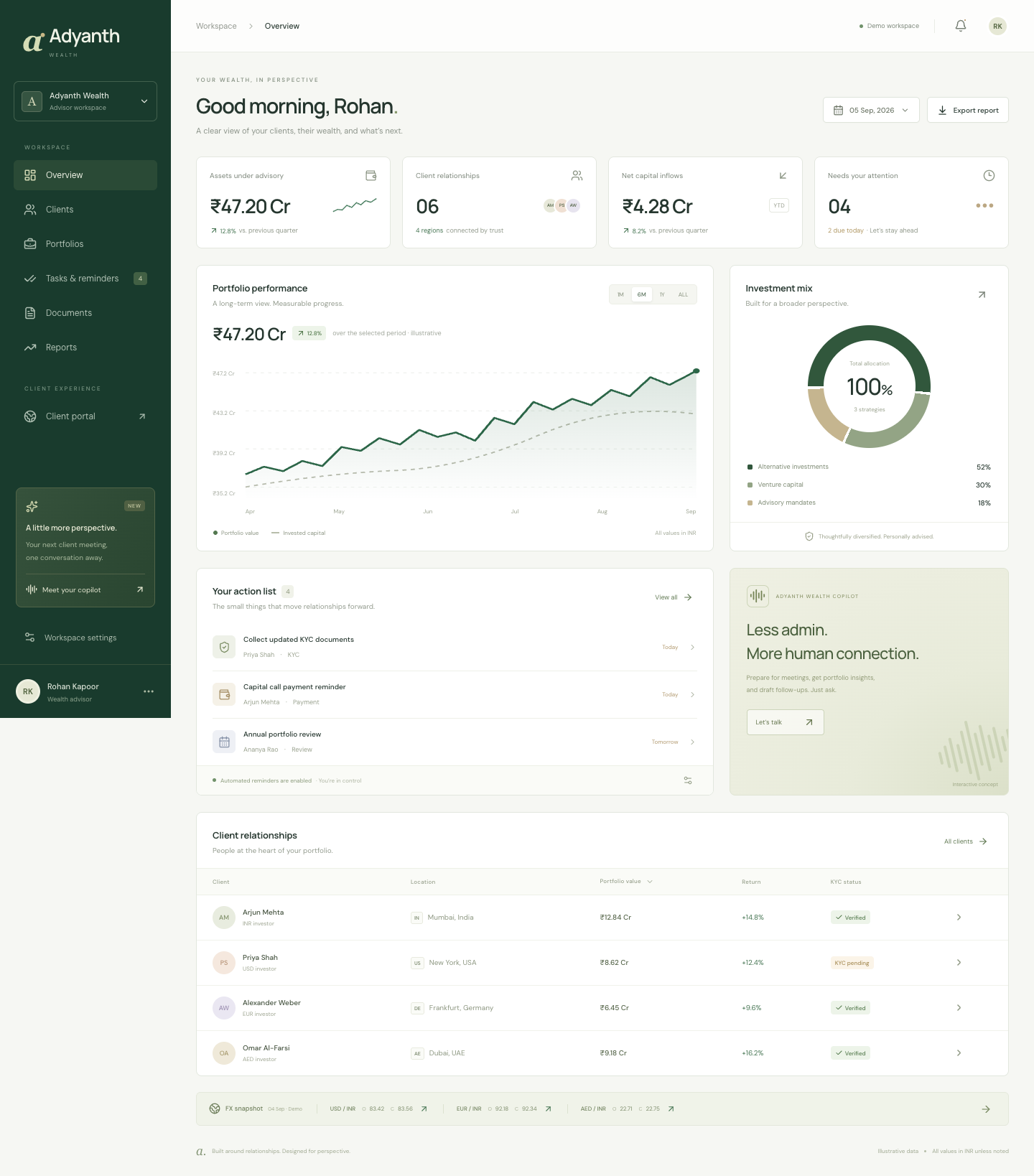
Adyanth advisory dashboard with portfolio performance and daily client actions
The complete picture.From portfolio to personal connection.
DESIGNED FOR WEALTH. BUILT AROUND PEOPLE.
THE PRACTICE

Focused by design.
Global by nature.

What you advise on

Investment advisory & counseling
Venture capital funding
Alternative investment funds

Mutual fund distribution and allocation excluded.

Who you serve

India · United States
Europe · Middle East

Foreign inflows, multiple currencies,
one coherent client view.
UI MVP

A tangible starting point.

Interactive interfaces and illustrative data. Ready for a product conversation; live integrations come next.

TWO EXPERIENCES. ONE SHARED PURPOSE.

The right perspective,
for each side of the relationship.

Explore the requested features, see how they appear in the product, and understand what comes next.

THE ADVISORY WORKSPACE

Less time assembling the picture. More time advising on it.

View full requirements
01 / PRACTICE OVERVIEW

The whole practice. In perspective.

Start the day with a clear picture of assets under advisory and the relationships that need attention.

THE FEATURE REQUEST

Give advisors a single view of their clients, portfolios, and daily priorities.

  • Assets under advisory, client count, and capital inflows
  • Portfolio performance with selectable chart periods
  • Investment strategy mix and daily action queue
  • Opening and closing FX snapshot
IMPLEMENTATION NEXT

Connect firm-scoped portfolio data, valuation history, and authoritative FX feeds.

01 / 07Interactive UI · Sample data
02 / CLIENT RELATIONSHIPS

Every relationship, remembered.

Bring client context into the conversation, from investment currency to verification status.

THE FEATURE REQUEST

Organize clients across India, the US, Europe, and the Middle East.

  • Search clients by name, email, or location
  • Filter by client region
  • Create a sample client and review their profile
  • View portfolio value, return, KYC status, and meeting brief
IMPLEMENTATION NEXT

Persist records in Supabase and implement advisor permissions, ownership, and audit history.

02 / 07Interactive UI · Sample data
03 / PORTFOLIO INTELLIGENCE

From commitment to carrying value.

A considered view of AIFs, venture investments, and advisory mandates, with assumptions visible.

THE FEATURE REQUEST

Track investment dates, current values, and projected carrying values.

  • Investment dates, paid-in amounts, and carrying values
  • 6-, 12-, and 24-month projection scenarios
  • Visible annual growth assumptions and formula
  • Foreign exchange opening and closing rate cards
IMPLEMENTATION NEXT

Connect investment records and dated valuations; review projection assumptions with the practice.

03 / 07Interactive UI · Sample data
04 / TASKS & REMINDERS

A thoughtful follow-up, right on time.

See upcoming obligations, review the message, and track the follow-through in one place.

THE FEATURE REQUEST

Automate reminders for payments, KYC collection, and compliance obligations.

  • Payment, KYC, review, and compliance task queue
  • Illustrative reminder cadence for each workflow
  • Editable email preview and draft approval action
  • Mark tasks complete and pause demo automation
IMPLEMENTATION NEXT

Implement scheduled jobs, email delivery, retries, audit logs, and firm-approved obligation rules.

04 / 07Interactive UI · Sample data
05 / DOCUMENT MANAGEMENT

A document room with context.

Find the document, the relationship, and the next action without switching tools.

THE FEATURE REQUEST

Keep statements and verification documents connected to each client.

  • Client-linked document list and document types
  • Available, awaiting upload, and review statuses
  • Download a sample investment statement
  • Select a local demo document filename
IMPLEMENTATION NEXT

Add private Supabase Storage, secure access policies, file validation, and review workflows.

05 / 07Interactive UI · Sample data
06 / REPORTING

Clarity, ready to share.

Move from a workspace view to a downloadable report for the next conversation.

THE FEATURE REQUEST

Make portfolio and operational information easy to review and export.

  • Client portfolio overview CSV
  • Outstanding obligations CSV
  • Opening and closing forex snapshot CSV
  • Exports generated from the current demo records
IMPLEMENTATION NEXT

Generate authenticated statements, approved templates, and period-specific reporting.

06 / 07Interactive UI · Sample data
07 / ADVISOR COMPANION

More prepared. More present.

A companion concept that helps advisors prepare for the human part of wealth management.

THE FEATURE REQUEST

Explore where voice assistance can reduce preparation and follow-up work.

  • Client meeting preparation brief
  • Sample portfolio summary
  • KYC follow-up draft
  • Browser read-aloud of scripted responses
IMPLEMENTATION NEXT

Integrate consented voice capture and AI grounded in authorized records, with advisor review.

07 / 07Scripted companion demo
FROM REQUEST TO REVIEWABLE PRODUCT

The complete
feature picture.

Both experiences at a glance. Expand any area for the detailed requirements and implementation scope.

For the advisory team

Practice, portfolios & follow-through

PRACTICE OVERVIEWUI demonstrated

Give advisors a single view of their clients, portfolios, and daily priorities.

  • Assets under advisory, client count, and capital inflows
  • Portfolio performance with selectable chart periods
  • Investment strategy mix and daily action queue
  • Opening and closing FX snapshot

Next: Connect firm-scoped portfolio data, valuation history, and authoritative FX feeds.

CLIENT RELATIONSHIPSUI demonstrated

Organize clients across India, the US, Europe, and the Middle East.

  • Search clients by name, email, or location
  • Filter by client region
  • Create a sample client and review their profile
  • View portfolio value, return, KYC status, and meeting brief

Next: Persist records in Supabase and implement advisor permissions, ownership, and audit history.

PORTFOLIO INTELLIGENCEUI demonstrated

Track investment dates, current values, and projected carrying values.

  • Investment dates, paid-in amounts, and carrying values
  • 6-, 12-, and 24-month projection scenarios
  • Visible annual growth assumptions and formula
  • Foreign exchange opening and closing rate cards

Next: Connect investment records and dated valuations; review projection assumptions with the practice.

TASKS & REMINDERSUI demonstrated

Automate reminders for payments, KYC collection, and compliance obligations.

  • Payment, KYC, review, and compliance task queue
  • Illustrative reminder cadence for each workflow
  • Editable email preview and draft approval action
  • Mark tasks complete and pause demo automation

Next: Implement scheduled jobs, email delivery, retries, audit logs, and firm-approved obligation rules.

DOCUMENT MANAGEMENTUI demonstrated

Keep statements and verification documents connected to each client.

  • Client-linked document list and document types
  • Available, awaiting upload, and review statuses
  • Download a sample investment statement
  • Select a local demo document filename

Next: Add private Supabase Storage, secure access policies, file validation, and review workflows.

REPORTINGUI demonstrated

Make portfolio and operational information easy to review and export.

  • Client portfolio overview CSV
  • Outstanding obligations CSV
  • Opening and closing forex snapshot CSV
  • Exports generated from the current demo records

Next: Generate authenticated statements, approved templates, and period-specific reporting.

ADVISOR COMPANIONUI demonstrated

Explore where voice assistance can reduce preparation and follow-up work.

  • Client meeting preparation brief
  • Sample portfolio summary
  • KYC follow-up draft
  • Browser read-aloud of scripted responses

Next: Integrate consented voice capture and AI grounded in authorized records, with advisor review.

For clients

Ownership, understanding & access

PERSONAL OVERVIEWUI demonstrated

Let clients see their own investment position and upcoming actions.

  • Portfolio value, paid-in capital, and unrealized gain
  • Total unfunded commitment and latest valuation date
  • INR, USD, EUR, AED, and GBP display currencies
  • Payment and KYC prompts, history, and statement download

Next: Add secure client authentication and enforce ownership for every record and download.

MY INVESTMENTSUI demonstrated

Show each investment’s date, commitment, current value, and remaining funding.

  • Investment name, strategy, and investment date
  • Committed, paid-in, current, and unfunded amounts
  • Downloadable investment history
  • Clearly separated 6-, 12-, and 24-month scenarios

Next: Connect approved client investment records and historical valuations; validate projection logic.

TRANSACTIONS & PAYMENTSUI demonstrated

Provide investment history and a clear process for upcoming capital calls.

  • Dated contribution history with original INR amounts
  • Activity filters and transaction CSV export
  • Capital-call amount, due date, reference, and demo notice
  • Payment reference and optional receipt selection

Next: Add verified payment instructions, secure receipt uploads, and advisor-led reconciliation.

DOCUMENTS & KYCUI demonstrated

Give clients one place for document requests, verification, and statements.

  • Identity and tax verification checklist
  • Annual address refresh request and due date
  • PDF, PNG, and JPG selection with a 5 MB limit
  • Demo review status and statement / document downloads

Next: Implement secure uploads, document expiry rules, review decisions, and client notifications.

FOREX & CONVERSIONUI demonstrated

Explain foreign-currency equivalents and separate investment growth from FX movement.

  • Two-way currency calculator and currency swap
  • Opening and closing rates with session changes
  • Dated illustrative rate source
  • Separate investment-gain and currency-impact example

Next: License live / historical FX data and store actual transaction rates, fees, and conversion dates.

MY ADVISORUI demonstrated

Help clients contact their advisor and request a portfolio review.

  • Dedicated advisor profile and sample contact details
  • Portfolio, payment, objectives, and support meeting topics
  • IST-labeled meeting slots and request cancellation
  • Local message drafting and saved-message preview

Next: Connect calendars, advisor availability, messaging delivery, and request notifications.

CLIENT COMPANIONUI demonstrated

Offer simple explanations of portfolio information and next actions.

  • Explain the client’s own sample portfolio
  • Summarize payment and document actions
  • Explain how currency conversion works
  • Read scripted answers aloud

Next: Add permission-aware AI and consented voice; keep investment decisions with the advisor.

A CLEAR PATH FORWARD

Designed today.
Connected next.

The current MVP makes the experience concrete. The next phase connects it to trusted data and real workflows.

  1. 01
    CURRENT · UI MVP

    See the experience

    Responsive advisor and client screens, sample records, CSV exports, local form interactions, and scripted voice companions.

  2. 02
    NEXT · SECURE FOUNDATION

    Connect the relationships

    Supabase authentication, advisor/client permissions, persistent investment records, private documents, and audit trails.

  3. 03
    FOLLOWING · LIVE WORKFLOWS

    Bring the practice together

    Email scheduling, document review, payment reconciliation, historical FX, valuation feeds, calendars, and consented AI/voice.

ADYANTH WEALTH

Built around wealth.
Centered on trust.

Explore the product scope or talk to Innoveric about your own advisory workspace.

Discuss a project like this
Adyanth Wealth · Product walkthroughIllustrative screenshots · UI MVP · September 2026Back to top ↑